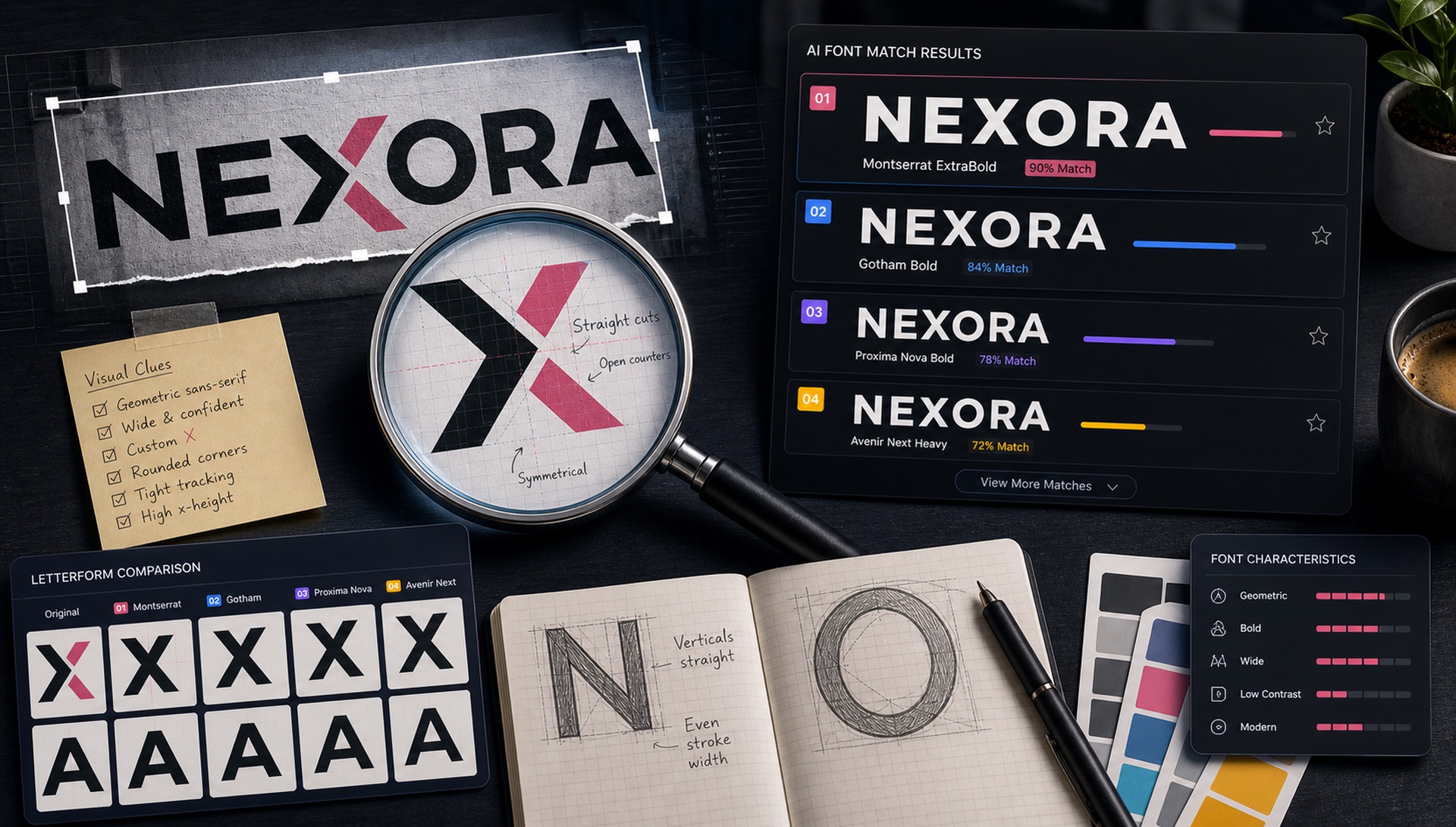
Brand logos are one of the most common font identification challenges. The typeface might be customised, the image might be low-resolution, and the text might be surrounded by icons and graphics. Here are three methods that work — ranked from easiest to most thorough.
Method 1: FontFinder AI (Fastest)
For the majority of logos using standard or popular typefaces, FontFinder's AI will identify the font directly:
- Find the brand's official website or press kit and take a screenshot of the logo at maximum resolution
- Upload to FontFinder
- Use the crop tool to draw a selection around just the text portion of the logo (excluding the icon/mark)
- Click "Identify Font" — if the typeface is represented in our 67,462 sample font index, you'll get a match
Success rate: ~85% for logos using standard or Google Fonts typefaces.
Method 2: SVG Inspection
Many modern websites serve their logo as an SVG file. SVG is XML-based and readable — you can open it in a text editor and look for font information directly:
- Right-click the logo on the website → "Save Image As" (if it saves as .svg, you're in luck)
- Open in a text editor or VS Code
- Search for "font-family", "typeface", or "font-name"
- If the text has been converted to paths (common), you won't find font data — but the shape data is still there for visual matching
Method 3: Browser DevTools
For websites where the logo text is real text (not an image), you can inspect it directly in browser DevTools:
- Right-click the logo text → "Inspect Element"
- In the Styles panel, look for
font-family - In the Computed tab, the resolved font family shows exactly what's rendering
- Some browsers (Chrome DevTools) show a "Fonts" panel that lists exactly which font files were loaded
Method 4: Read the Website's Font Files Directly
If the logo is set in the same typeface as the site's headings, you can often skip identification entirely and read the font name out of the network request:
- Open the site and press F12 to open DevTools
- Go to the Network tab and filter by
Font - Reload the page — every web font the site loads appears in the list
- The filename usually contains the family name, e.g.
GT-Walsheim-Bold.woff2
This works even when the CSS uses an obfuscated font-family name, because the file itself still has to be served. It is the single most reliable method when it applies.
When the Font is Custom
Major brands often commission custom typefaces. In these cases, FontFinder will show you the closest matching fonts in our database. These "near matches" are usually from the same type family or inspired by the same design tradition — useful when you need a similar-looking alternative that's actually available.
Tips for Low-Resolution Logos
- Search for the brand's press/media kit — they often include high-res logo files
- Try Wikipedia — brand logo files are often high resolution SVG
- Use the brand's LinkedIn or official website header which often uses vector logos
- Check app store listings, which require high-resolution icon and banner assets
- Look at the brand's annual report or investor deck PDFs, which are usually vector throughout
- FontFinder's preprocessing pipeline handles blurry images — try uploading even if the resolution looks poor
Why So Many Logos Cannot Be Matched Exactly
Logo type is the hardest category in font identification, and it helps to know why before you spend an hour on it. Wordmarks routinely go through modifications that break geometric matching:
- Custom kerning. Nearly every professional wordmark has manually adjusted letter spacing. This does not change the letterforms, but it does change the rhythm you compare against.
- Modified letterforms. A shortened descender, a flattened terminal, a redrawn 'a' — small changes that make the mark ownable and defeat exact matching.
- Fully custom typefaces. Netflix Sans, Airbnb Cereal, YouTube Sans and Apple's San Francisco were drawn for one client and are not licensable at all.
- Optical corrections. Stroke weights adjusted so the mark looks balanced at small sizes, which alters the weight signature a matcher reads.
- Hand-lettering. Coca-Cola and Instagram's original wordmark were drawn, not typed. There is no source font.
When any of these apply, a "close match" is the correct and useful answer — it gives you a font with the same design DNA that you can actually license.
Where the Original Font Usually Still Exists
Even when the wordmark is customised, brands rarely custom-draw everything. The unmodified typeface is often sitting nearby:
- The tagline or descriptor line under the logo
- Navigation labels and button text on the website
- Slide headers in the company's public decks
- Packaging side panels and legal text
- Email footers and press release letterheads
Crop from one of those instead of the wordmark and your hit rate goes up substantially.
Licensing a Font You Found in a Logo
This is where identification turns into a legal question, and the distinction matters:
- The typeface is software. It is licensed by the foundry, and licences are sold per use case — desktop, web, app, ePub, broadcast.
- The logo is the brand's trademark. Identifying the font does not give you any right to reproduce their mark.
- Logo embedding. Several foundries require a separate extended licence to use their typeface inside a registered trademark. Check the EULA before you build a brand on it.
- OFL fonts (everything on Google Fonts) can be used in logos, commercially, without payment or permission.
In short: you can license and use the same font. You cannot use their logo.
A Realistic Success-Rate Expectation
Based on the categories above, here is roughly what to expect:
- Small business and startup logos — high hit rate. Most use an off-the-shelf Google Font or a popular foundry release, unmodified.
- Mid-market brands — moderate. Usually a licensed commercial typeface with custom kerning, which still matches at the family level.
- Global consumer brands — low for exact matches, high for close relatives. Assume custom until proven otherwise.
- Script and handwritten marks — lowest. Often genuinely hand-drawn.
Knowing which bucket you are in before you start saves a lot of frustration — and tells you immediately whether "close match" is a fallback or the actual goal.