Serif or sans-serif? It's the most fundamental decision in typography — and one that designers and non-designers alike wrestle with constantly. Here's a clear framework for making the right choice every time.
What's the Actual Difference?
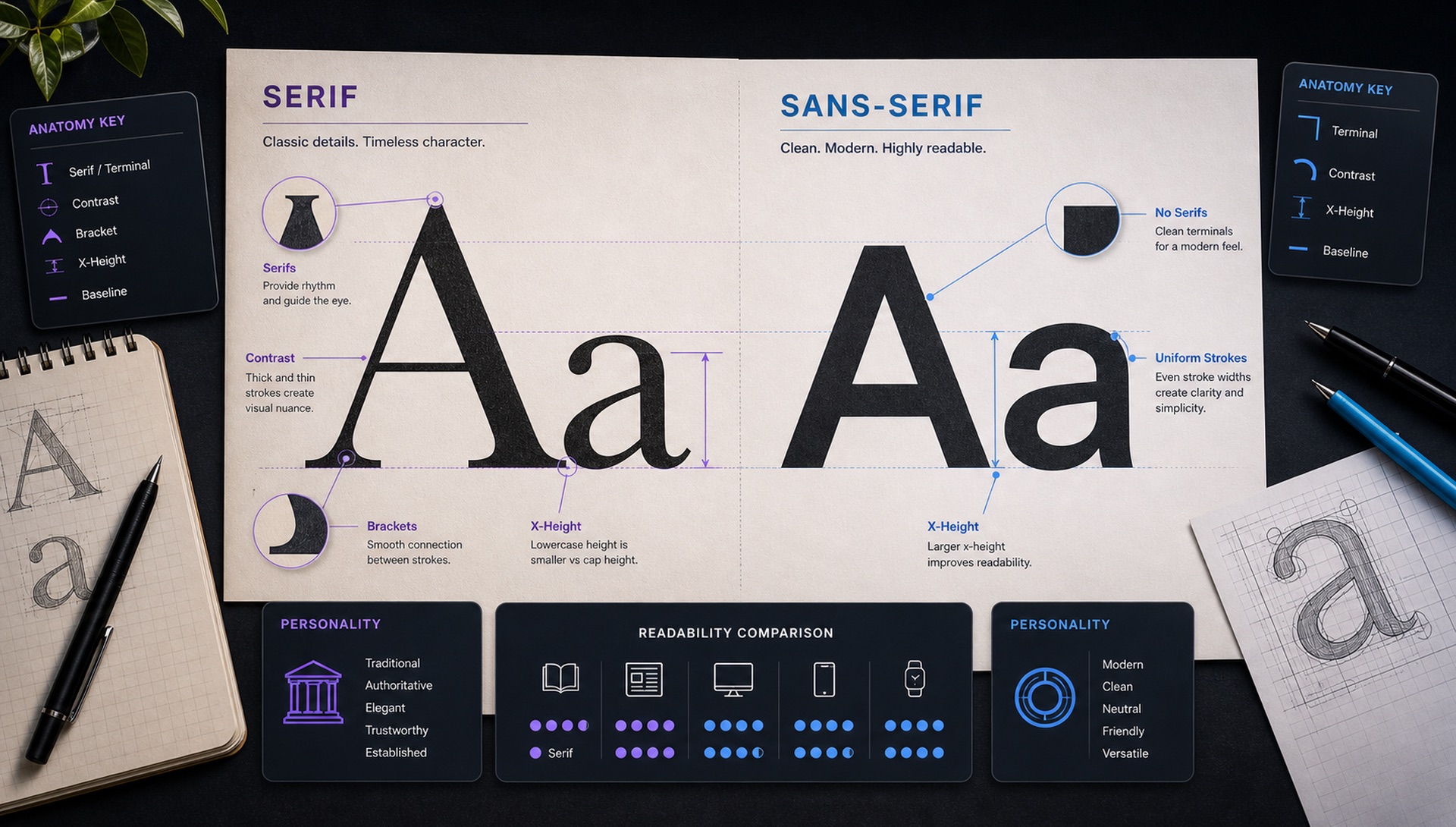
Serifs are the small decorative strokes that finish the ends of letterforms. A capital 'T' in Times New Roman has small horizontal bars at the tops and bottoms of its strokes — those are serifs. Remove them and you have a sans-serif 'T', like in Helvetica.
The Readability Myth
You've probably heard that serifs are easier to read in print, and sans-serifs are better on screens. This was largely true in the early days of low-resolution displays, when serifs would render as pixel mush. On modern displays — particularly Retina and high-DPI screens — serifs render beautifully, and the readability advantage has largely disappeared.
The more accurate statement: serifs have a more formal, classical personality; sans-serifs have a modern, neutral personality. Choose based on the personality you need, not readability mythology.
When to Choose Serif
- Luxury and premium brands — Heritage, craftsmanship, quality
- Editorial and publishing — Newspapers, magazines, books
- Law, finance, and professional services — Trust, authority, stability
- Fashion and lifestyle — Especially high-contrast editorial serifs
- Long-form reading — When users will read paragraphs, not scan
When to Choose Sans-Serif
- Technology and software — Modern, clean, efficient
- Startups and scale-ups — Approachable innovation
- UI and app design — Especially at small sizes
- Healthcare and accessibility — Clarity is paramount
- International brands — Sans-serifs translate better across cultures
The Sub-Categories That Actually Matter
"Serif" and "sans-serif" are the top-level buckets, but the real decision usually happens one level down. Two serifs can feel as different from each other as a serif and a sans do.
Serif sub-categories
- Old-style (Garamond, Sabon, EB Garamond) — Low stroke contrast, angled stress, small x-height. Reads as literary and traditional. Excellent for books, poor for small UI text.
- Transitional (Baskerville, Georgia, Libre Baskerville) — More contrast, vertical stress, larger x-height. The safest all-purpose serif choice.
- Didone / Modern (Bodoni, Playfair Display, Didot) — Extreme thick-to-thin contrast with hairline serifs. Stunning at 60px and above; falls apart below 16px.
- Slab (Roboto Slab, Zilla Slab, Arvo) — Thick rectangular serifs, minimal contrast. Reads more like a sans with brackets. Strong for headings on screens.
Sans-serif sub-categories
- Grotesque (Helvetica, Inter, Libre Franklin) — Neutral, tight apertures, workhorse quality. The default for UI.
- Geometric (Futura, Poppins, Outfit) — Built from circles and straight lines. Distinctive and modern, but tiring in long paragraphs because letters look alike.
- Humanist (Open Sans, Source Sans, Lato) — Calligraphic skeleton, open apertures, varied letter shapes. The most legible sans category at small sizes.
- Neo-grotesque (Roboto, Neue Haas) — Refined grotesques tuned for screen rendering.
What the Research Actually Says About Legibility
Study after study has failed to find a meaningful reading-speed difference between serif and sans-serif text at normal reading sizes on modern screens. What does move the needle, consistently:
- x-height — The height of a lowercase 'x' relative to the capitals. Larger x-heights read better at small sizes. This is why Inter and Open Sans work in interfaces and Garamond does not.
- Aperture — How open the gaps are in letters like c, e, s, and a. Closed apertures (Helvetica) blur into each other at small sizes; open apertures (Source Sans) stay distinct.
- Character disambiguation — Whether uppercase I, lowercase l, and the digit 1 are visually distinct. Critical for anything containing codes, IDs, or passwords.
- Line length and line height — A well-set serif at 65 characters per line will out-read a badly set sans every time.
The practical conclusion: if legibility is your concern, pick a humanist face with a generous x-height and open apertures — the serif question is secondary.
How Size and Medium Change the Answer
A font that works at 72px on a poster may be unusable at 13px in a table. Some rules that hold up:
- Below 14px — Avoid high-contrast serifs entirely. The thin strokes disappear or alias badly. Use a humanist sans.
- 16–20px body text — Either category works. Choose on personality.
- Above 40px display — Serifs shine. The details you lose at small sizes become the whole point at large ones.
- Print — Ink spread thickens strokes slightly, so serifs designed for print (Caslon, Freight Text) hold up better than screen-first fonts like Inter.
- Signage and wayfinding — Sans-serif, high x-height, wide letter-spacing. Readability at distance and at an angle is the only criterion.
Accessibility Considerations
Neither category is inherently more accessible, but specific choices matter for readers with dyslexia or low vision:
- Avoid fonts where 'b' and 'd' are exact mirrors of each other — asymmetric letterforms help.
- Ensure a distinct capital I, lowercase l, and digit 1.
- Keep body text at 16px minimum with line-height of at least 1.5.
- Never rely on a light weight (300 or below) for body copy — contrast against the background drops below WCAG-comfortable levels.
- Avoid pure black on pure white; a slightly softened contrast reduces visual fatigue.
The Power of Combining Both
The most sophisticated typographic systems use both: a serif for display/headline purposes and a sans-serif for body text (or vice versa). This creates visual hierarchy and contrast that makes designs feel considered and intentional.
Common effective pairings: Playfair Display (serif headline) + Inter (sans body). Cormorant (serif display) + DM Sans (sans UI). Georgia (serif editorial) + Roboto (sans functional).
The rule that keeps pairings from clashing: make the two fonts obviously different. Two similar sans-serifs read as a mistake. A serif and a sans read as a decision.
A Five-Question Decision Checklist
- What is the smallest size this font must work at? Under 14px rules out high-contrast serifs.
- Screen, print, or both? Both means picking a face with print and screen optical sizes, or accepting a compromise.
- What personality does the brand need? Heritage and authority lean serif. Efficiency and neutrality lean sans.
- How much text will people actually read? Paragraphs need comfort; labels need clarity.
- What languages must it support? Many beautiful serifs cover Latin only. Check before committing.
How to Identify Which You're Looking At
Look at the capital letters I, T, and L. If you see small horizontal strokes at the ends of vertical strokes, it's a serif. If the strokes end cleanly, it's a sans-serif. Then check the lowercase 'a' and 'g' — a double-storey 'a' and a two-storey 'g' usually signal an old-style or transitional design, while single-storey versions point to geometric sans-serifs.
When in doubt, upload an image to FontFinder — we'll tell you the exact typeface and its classification, plus close alternatives in the same category if the original is unavailable or expensive to license.
Frequently Asked Questions
Is serif or sans-serif better for a website body text? Either works on modern displays. Pick based on brand personality, then verify the specific font has a large x-height and open apertures at your chosen size.
Can I use a serif for a tech brand? Yes — and increasingly designers do. A serif in a software context reads as confident and editorial precisely because it defies the convention.
How many fonts should one site use? Two families is the sweet spot. One family with several weights is also perfectly professional.